
DASHBOARD
Your Control Center.
Everything at a glance.

Stay on top of everything with a clear overview of your rental operations.
The dashboard shows current bookings, upcoming and overdue returns, and critical inventory levels—all in one place. Key metrics and statuses are presented in an intuitive way, allowing you to quickly identify urgent actions and keep your operations running smoothly.
RESERVATION DETAILS
Full Control -
Over Every Booking.

Access and manage all reservation information in a single view.
Swap items, update serial numbers, adjust rental periods, or modify booking details with real-time availability checks. Generate PDFs and send confirmation emails with just one click. Completed rentals can be closed and anonymized when needed.
BOOKING ANALYSIS
Know who borrowed
what and when.

Quickly access the full rental history of any user or item. Search by borrower name, item number, or combine both to get precise insights into current, planned, and past bookings.
AUTOMATED REMINDERS
Reduce late returns -
effortlessly.


Track upcoming and overdue returns via the dashboard and send automated email reminders before due dates. For overdue items, multi-level dunning processes can be configured - including optional late fees.
SCAN & GO
Avoid errors
and save time.

Use the scanning app to check items in and out quickly and reliably. Scanning ensures the correct items and serial numbers are always assigned - no mix-ups.
INVENTORY OVERVIEW
See availability
at a glance.

Monitor your inventory with a visual calendar. Filter by categories or search for specific items to instantly understand availability and usage.
RESPONSIVENESS
High-performance web shop
for all screen sizes.

Whether on smartphone, tablet, or desktop - CampusLend web shop offers a fast, modern interface. Users can easily browse and book items with built-in availability checks on any device.
ARTICLE TYPES
The Right Item Type
for Every Need.

With four item types, EduLendo supports different equipment lending requirements:
-
Quantity Items: Easily manage identical items, such as cables or chairs, by quantity without tracking individual units.
-
Items with sub-items: Register and lend equipment, such as cameras or projectors, individually. Each unit remains uniquely identifiable and trackable.
-
Set items: Reserve, check out, and return related equipment, such as a camera, lens, and microphone, together as a predefined set.
-
Return Keys: Manage keys for after-hours equipment returns, allowing borrowers to return items outside regular opening hours.
RETURN KEYS
Stay flexible beyond
opening hours.

Allow returns outside regular hours by using return keys. The system automatically detects extended return times and adds available keys to the booking when needed.
SMART FILTERS
Filter by attributes,
find items faster.
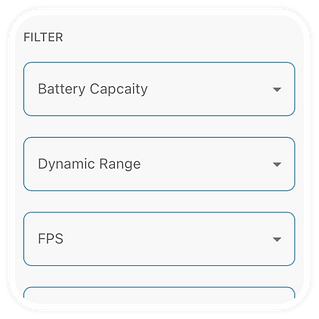
Define custom attributes for your inventory and let users filter items - both in the frontend shop and the backend.
OPENING HOURS
Adapt to your schedule.

Set different opening hours for weekdays, semesters, or break periods. Combine with extended return options for maximum flexibility.
ITEM VARIANTS
Offer more choice.

Display different configurations of the same item (e.g., equipment variations) clearly in your shop, allowing users to select exactly what they need.
QUICK VIEW IN THE SHOP
Instant clarity
with Quick View.

Boost user satisfaction with smart preview cards in your web shop. Borrowers can instantly see key details and identify the right items - without opening multiple pages.
SERIAL NUMBERS
Flexible and structured
serial number management.

Create serial numbers for sub-items using customizable prefixes and suffixes. Keep your inventory well-organized and maintain full control - even with complex item structures.
INVENTORY MANAGEMENT
Multiple locations.
Full control.


Create as many storage locations as you need and make them available for selection in your web shop. The assigned location of each item is displayed in the reservation details as well as on the PDF rental confirmation.
In addition to the storage location, you can define a specific storage position and shelf for both items and sub-items. This information is also included in your generated PDF documents, ensuring clear organization and smooth operations.
CUSTOM CHECKOUT PROCESS
A booking workflow tailored to your needs.

Adapt the checkout process in your web shop to match your internal workflows. From approval steps and responsible persons to cost centers and project details - everything can be customized.
ACCESS CONTROL
Full control with flexible permissions.

Decide whether items can be booked via the web shop or only issued manually. Define approval requirements and restrict access to specific user groups - so you stay in control at all times.
RECURRING BOOKINGS
Book items in recurring cycles.

Allow users to create recurring bookings based on predefined time periods (e.g. semesters) or custom date ranges. Flexible scheduling makes it easy to reserve items on a regular basis.
All pickup and return times are automatically aligned with your availability and opening hours - ensuring smooth and conflict-free bookings.
AVAILABILITY
Know what’s available -
instantly.

Show real-time availability in your shop so users can see at a glance when items can be booked - no guesswork, no back-and-forth, no support calls.
ROLE MANAGEMENT
Control access
with precision.

Create roles, assign permissions, and define who can access sensitive features - keeping your system secure and organized.
NOTES
Keep context where it matters.

Add notes to borrowers and track important details - timestamped, attributed, and always accessible.
SUB-ITEM REPLACEMENT
Swap items -
in seconds.

Replace reserved sub-items with available alternatives - no searching, no delays.
PDF FILES
Clear DPFs.
Every Detail at a Glance.

Create well-organized rental documents that make it easy to review items, rental dates, and key details.
Ready to download, print or share with your borrowers.
BULK ACTIONS
Handle everything
at once.

Check out or return all items in a reservation with a single click.
GUIDES & LINKS
Everything
in one place.

Attach manuals, videos, and links directly to items - always accessible when needed.
APPROVAL WORKFLOW
Automated or manual approvals.


Requests that require approval are first submitted as pending inquiries and automatically sent to an authorized approver. Approvers can be predefined or selected by the user during checkout.
Once approved, the request is converted into a confirmed reservation and the user is notified automatically. If declined, the user is informed via email.
GROUP RESTRICTIONS
Limit access by
study program.

Restrict items based on user attributes from your directory (e.g. study program). Users only see and book items approved for their group.
EAN CODES
Label and scan
with ease.


To uniquely identify each item, the lending system automatically generates an EAN barcode and a QR code for every item number. You can download these codes as a PDF file and attach them to your equipment.
This allows items to be quickly scanned using a scanning app during check-out and return. QR codes are particularly space-efficient, making them ideal for labeling even smaller items.
USER ADDRESSING
Communicate your way.

Define how users are addressed - neutral, female, male, or diverse. Applied consistently across emails and PDF documents.
CRITICAL INVENTORY
Stay ahead of shortages.

Set custom minimum stock levels for each item. When the threshold is reached, items are automatically flagged in your dashboard.
OPTIONAL ACCESSORIES
Suggest the right add-ons

Link optional accessories to items so users can easily find and add what they need.
CATEGORIES
Structure your
inventory.

Create as many categories and subcategories as you like to organize items in a clear and scalable way.
ID CAPTURE
Verify on
handover.

Capture ID photos during check-out and store them automatically with the reservation.
LIMITS & BUFFERS
Control availability
precisely.

Set booking limits and buffer times before and after rentals to keep your inventory ready and protected.
SIMILAR ITEMS
Always offer
alternatives.
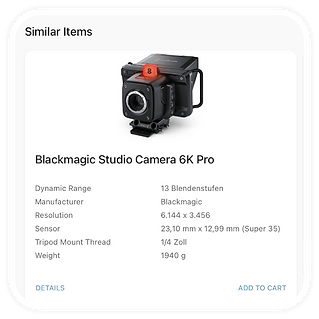
Show similar items when something is unavailable - so users can keep moving without interruption.
WELCOME MESSAGES
Guide users
from the start.


Display custom welcome messages to introduce new users and explain your rental process on first login.
MULTI TENANT SUPPORT
Manage multiple organizations.


Organize users, staff, and items across multiple tenants. Each tenant can operate independently - with its own workflows, permissions, and approval processes. Need help getting started? We’re happy to support you with setup and planning.
LEGAL PAGES
Keep everything
compliant.

Add links to terms, privacy policies, imprint, and support - directly accessible in your shop.
PDF TEXT CUSTOMIZATION
Customize texts
in your PDF files.

Customize texts and messaging across all PDFs - requests, reservations, delivery notes, and reminders.
USER OFFBOARDING
Stay on top
of departures.
Get notified when users are leaving - so you can review and close any open rentals in time.
AUTO CLEANUP
Automatic anonymization and deletion.
Automatically anonymize closed bookings and remove users for example after 12 months of inactivity - fully compliant and maintenance-free.